 |
 |
 |
 |
 |
| Gubbs Copy Data II is a software application enables users to manage raw data and associated files acquired on a data acquisition workstation. An age-old problem with scientific data acquisition is local workstation hard drive raw data administration. Local data acquisition workstation hard drives become full and require transfer, archival, backup or deletion of data acquisition raw data and related files. This is especially true for full-scan mass spectrometry workstations whose raw data files can be huge. 1. Manual data file backup/archive workflows (most often to a network shared drive) may be implemented, but can be troublesome and tedious: • Manual copy/paste actions completed using Microsoft® Windows Explorer can be exceedingly slow, especially when trying to copy tens of gigabytes of data. There is a significant amount of overhead associated with the use of Windows Explorer. • If an error occurs during a Microsoft Windows Explorer copy event, Windows Explorer terminates and it is unknown which data files have been copied and which have not been copied. 2 Proposed Workflow From a high level, the following would be a desirable workflow for an automated data acquisition workstation backup software solution (either manually executed within the software or ran using a scheduler within the software). a. COPY files from one or more user-defined directories on the local data acquisition workstation to the network. b. MOVE the just-copied files from the data acquisition workstation to a temporary location (preferably on the local data acquisition workstation). c. DELETE the files located in the temporary location that are older than a certain number of user- defined days. 3 Gubbs® Inc. Copy Data II software solution Gubbs Inc. Copy Data II has all the features described in the proposed workflow. As well, it contains the following additional features: Accepts command line switches that can be used to call Copy Data II from an external application. o Different copy scenarios may be stored in different .ini files and called from different desktop shortcuts o Copy Data II may be called with different command line switches to perform specific instructions Log files are created detailing each copy/move/delete/.sld modification action. o For regulated environments, logs may be saved as .pdf or .xps. Exclude files with user-defined file extensions or user-defined locations. Has raw file vendor-specific features o Thermo Automatically update Thermo sequence file (.sld) Path, Processing Method, Calibration Method, and Instrument Method columns. Ignore copying Thermo date-time-stamped sequence audit files. o Sciex For Move/Delete actions, allows users to instruct CopyData II to not delete if any Analyst subfolder contains files . o Acquity Special function to allow Destination source to be created by overcoming Acquity's non-Analyst subfolder limitation |
Copy Data II

Gubbs, Inc.
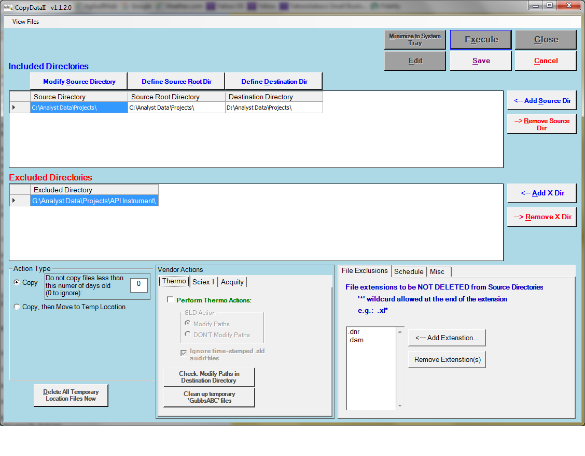
Figure 1 - Copy Data II Console
| Go to the Copy Data II Download Page to obtain manuals FREE trial version purchased setup files |
| Click here to view current pricing or Contact Us |